If you’re new to the Model Context Protocol (MCP), I highly recommend reading the official introduction. In short, MCP is an open standard that enables AI agents to securely interact with your local code and data context.
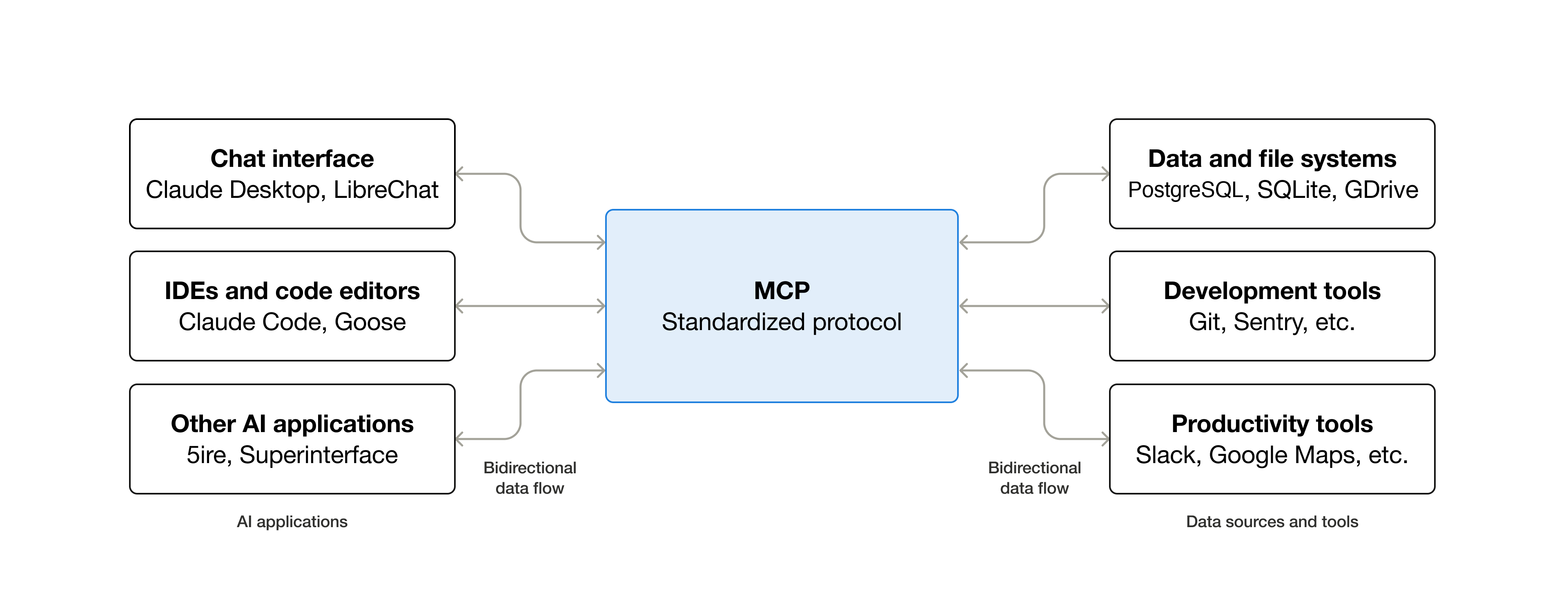
Recognizing this potential, SAP has released several official MCP servers designed to supercharge AI-assisted development for the SAP ecosystem, specifically tailored to the developer’s perspective.
SAP
Cloud Application Programming Model (CAP)
A Model Context Protocol (MCP) server for the SAP Cloud Application Programming Model (CAP). Use it for AI-assisted development of CAP applications (agentic coding).
For the best experience we recommend using this server alongside @ui5/mcp-server and @sap-ux/fiori-mcp-server.
Usage
- Which CDS services are in this project, and where are they served?
- What are the entities about and how do they relate?
- How do I add columns to a select statement in CAP Node.js?
Rules
Add these rules to your existing global or project-specific AGENTS.md.
1 | - You MUST search for CDS definitions, like entities, fields and services (which include HTTP endpoints) with cds-mcp, only if it fails you MAY read \*.cds files in the project. |
Installation
Claude Code
Run this command to add the server. See Claude Code MCP docs for more info.
Local Server Connection
1 | claude mcp add cds-mcp -- npx -y @cap-js/mcp-server |
VS Code
Add this to your VS Code MCP config file. See VS Code MCP docs for more info.
Local Server Connection
1 | { |
OpenCode
Add this to your OpenCode configuration file. See OpenCode MCP docs for more info.
Local Server Connection
1 | { |
Cursor
Add this to your Cursor configuration file. See Cursor MCP docs for more info.
Local Server Connection
1 | { |
SAP Fiori Elements
The SAP Fiori MCP server enables developers using AI coding assistants to generate and adapt SAP Fiori elements applications with precision and context awareness.
For the best experience we recommend using this server alongside @cap-js/mcp-server and @ui5/mcp-server.
Usage
- Please add a SAP Fiori elements list report app to my CAP project
- Generate a new CAP project and SAP Fiori app based on my_picture.png
- Enable initial load for the fiori app
Rules
Add these rules to your existing global or project-specific AGENTS.md.
1 | ## Rules for creation or modification of SAP Fiori elements apps |
Installation
Claude Code
Run this command to add the server. See Claude Code MCP docs for more info.
Local Server Connection
1 | claude mcp add fiori-mcp -- npx --yes @sap-ux/fiori-mcp-server@latest fiori-mcp |
VS Code
Add this to your VS Code MCP config file. See VS Code MCP docs for more info.
Local Server Connection
1 | { |
OpenCode
Add this to your OpenCode configuration file. See OpenCode MCP docs for more info.
Local Server Connection
1 | { |
Cursor
Add this to your Cursor configuration file. See Cursor MCP docs for more info.
Local Server Connection
1 | { |
SAPUI5
The UI5 Model Context Protocol server offers tools to improve the developer experience when working with agentic AI tools.
- Helps with the creation of new UI5 projects
- Detects and fixes UI5-specific errors in the code
- Provides additional UI5-specific information
For the best experience we recommend using this server alongside @cap-js/mcp-server and @sap-ux/fiori-mcp-server.
Usage
- Check my UI5 app for deprecated APIs
- Generate a UI5 app with current best practices
- What’s the correct way to implement data binding in UI5?
Rules
Add these rules to your existing global or project-specific AGENTS.md.
1 | ## Guidelines for UI5 |
Installation
Claude Code
Run this command to add the server. See Claude Code MCP docs for more info.
Local Server Connection
1 | claude mcp add ui5-mcp-server -- npx @ui5/mcp-server |
VS Code
Add this to your VS Code MCP config file. See VS Code MCP docs for more info.
Local Server Connection
1 | { |
OpenCode
Add this to your OpenCode configuration file. See OpenCode MCP docs for more info.
Local Server Connection
1 | { |
Cursor
Add this to your Cursor configuration file. See Cursor MCP docs for more info.
Local Server Connection
Note: Cursor does not support MCP resources. Set the
UI5_MCP_SERVER_RESPONSE_NO_RESOURCESenvironment variable to disable resources in the server responses.
1 | { |
UI5 Web Components
The UI5 Web Components MCP server provides AI assistants with access to UI5 Web Components API documentation, framework integration guides, and theming documentation. It enables AI-assisted development with UI5 Web Components across React, Angular, Vue, and vanilla JavaScript.
Usage
- Show me the API for ui5-button
- How do I use UI5 Web Components with React?
- Show me the available documentation
- Get the theming documentation
Installation
Claude Code
Run this command to add the server. See Claude Code MCP docs for more info.
Local Server Connection
1 | claude mcp add webcomponents-mcp -- npx -y @ui5/webcomponents-mcp-server |
VS Code
Add this to your VS Code MCP config file. See VS Code MCP docs for more info.
Local Server Connection
1 | { |
OpenCode
Add this to your OpenCode configuration file. See OpenCode MCP docs for more info.
Local Server Connection
1 | { |
Cursor
Add this to your Cursor configuration file. See Cursor MCP docs for more info.
Local Server Connection
1 | { |
SAP Mobile development Kit (MDK)
This open-source server provides AI agents with comprehensive MDK knowledge and tools. By combining best practice guidelines, project-aware context information, templates for creating new projects, and access to the MDK CLI tools, the MDK MCP server transforms AI agents into MDK development experts.
Usage
- Generate a new MDK project displaying OData entities information.
- Enhance an existing project adding additional UI controls on a given page.
- Validate your current MDK project schema.
- Migrate old MDK projects to latest schema.
- Deploy your MDK project.
Rules
Add these rules to your existing global or project-specific AGENTS.md.
1 | - Don't generate `.service.metadata` file. |
Installation
Claude Code
Run this command to add the server. See Claude Code MCP docs for more info.
Local Server Connection
1 | claude mcp add mdk-mcp -- mdk-mcp --schema-version 25.9 |
VS Code
Add this to your VS Code MCP config file. See VS Code MCP docs for more info.
Local Server Connection
1 | { |
OpenCode
Add this to your OpenCode configuration file. See OpenCode MCP docs for more info.
Local Server Connection
1 | { |
Cursor
Add this to your Cursor configuration file. See Cursor MCP docs for more info.
Local Server Connection
1 | { |
AMAZON
ABAP Accelerator for Amazon Q Developer
ABAP Accelerator is an MCP server that helps organizations create, test, document, and transform SAP ABAP code faster and with higher code accuracy.
Usage
- Get source code for class ZCL_TEST from ECC system
- Create a new class in S/4HANA system
- Now check the same class in S/4HANA
References
- Boost your CAP development with AI: Introducing the MCP Server for CAP
- SAP Fiori Tools Update: First Release of the SAP Fiori MCP Server for SAP Fiori Elements
- Give your AI Agent some Tools - Introducing the UI5 MCP Server
- Developing Mobile Apps with AI Agents: Introducing the MCP Server for Mobile
- Evaluating SAP’s new MCP Servers: UI5, CAP and Fiori Tools in practice
- Give your AI Agent some Tools - Introducing the UI5 MCP Server
- ABAP with Amazon Q Developer
- The 7 current MCP servers for SAP you should pin